Supplemental Content: declaring how your product is hosted on Azure
🟣 What is the Supplemental Content section?
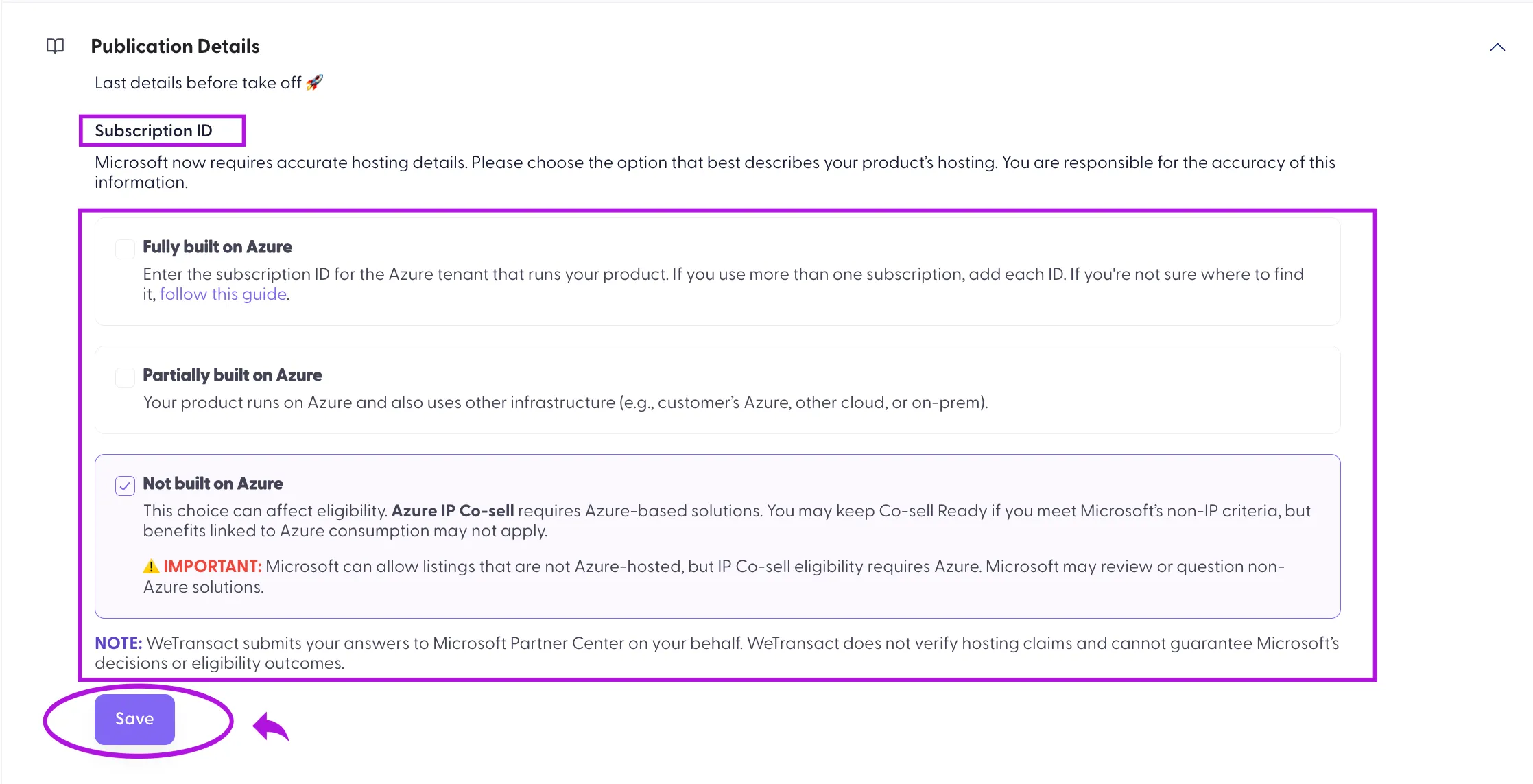
Supplemental Content is a section of your SaaS listing where you tell Microsoft how your product is hosted: fully on Azure, partially on Azure, or not on Azure. Microsoft uses this to check that your listing meets Microsoft Marketplace policies and program eligibility.
Microsoft now requires this information to be accurate and complete. If it is missing or invalid, you can't publish updates to your listing until it's corrected.
Note: Your live listing stays live. This only blocks new updates from being published. It is not a delisting.
🟣 What you need to do?
- Review how your product is hosted today.
- Choose the option that most accurately describes it.
- If you choose Fully built on Azure, add your Azure Subscription ID(s).
- Republish the listing.
If you have more than one listing, do this for each one. Each listing must be republished separately
Important: You are responsible for the accuracy of this information. WeTransact submits your answers to Microsoft Partner Center on your behalf, but can't choose an option for you.
🟣 Which option describes your product?
Option | What it means | Subscription ID |
|---|---|---|
Fully built on Azure | Your product runs in your own Azure tenant, and you manage the Azure resources it runs on (for example App Services, virtual machines, AKS, Azure SQL). | Required |
Partially built on Azure | Some of your product relies on Azure, but not all of it. | Not required [TO CONFIRM — see note below] |
Not built on Azure | Your product doesn't rely on Azure infrastructure to run. | Not required |
🟣 Examples of Partially built on Azure:
- Your core app runs on Azure, but your data is stored elsewhere
- Your app is deployed into your customers' Azure subscriptions
- A hybrid setup across Azure and another cloud or on-premises
🟣 Examples of Not built on Azure:
- Hosted on AWS or Google Cloud
- Fully on-premises
- SaaS hosted on non-Azure infrastructure
Tip: Describe your product as it is hosted today, not as it will be. If you're planning to move to Azure but aren't running on it yet, choose the option that reflects your current setup.
[TO CONFIRM — Microsoft Learn states that if any portion of the product is platformed in the publisher's own Azure infrastructure, the subscription where it runs will be reviewed and subscription IDs are required. Check whether the Partner Center form asks for a Subscription ID under "Partially built on Azure" before publishing this table.]
🟣 How to add your Azure Subscription ID?
This applies if you choose Fully built on Azure.
- Find the Subscription ID for the Azure subscription that runs your product. If you're not sure where to find it, follow How to find your subscription ID.
- If your product runs across more than one subscription, add each ID.
- Enter the ID(s) in the Supplemental tab of your listing in the WeTransact portal. See How do I add a subscription ID to the supplemental tab in the WeTransact portal?
- Save and republish the listing.
Warning: Only enter a subscription that actually runs your product. Don't create a new subscription just to complete this section.
🟣 How your choice affects eligibility
- Fully or Partially built on Azure: Choosing Partially doesn't automatically remove Co-sell Ready status.
- Not built on Azure: Your listing isn't delisted and can stay live if it meets Microsoft's criteria for non-Azure solutions. However, Azure IP co-sell requires an Azure-based solution, so benefits linked to Azure consumption may not apply. Microsoft may also review or ask questions about non-Azure solutions.
Note: WeTransact doesn't verify hosting claims and can't guarantee Microsoft's decisions or eligibility outcomes.
🟣 FAQs
I'm not sure how much of my product runs on Azure. What should I do?
Ask your CTO, cloud architect or Azure admin. You don't need a deeply technical answer. If Azure runs some components but not everything, Partially built on Azure is a valid and common choice.
Can WeTransact choose the option for me?
No. Microsoft requires publishers to confirm their own hosting details. WeTransact submits what you provide.
I don't have an Azure Subscription ID.
You only need one if you choose Fully built on Azure. If you choose Partially or Not built on Azure, you don't need to provide one.
We chose a different option before. Is that a problem?
No. Microsoft is now enforcing this more strictly, so many publishers are reviewing their answers. Updating it now helps avoid issues later.
Can I change my answer later?
Yes. Update the selection and republish the listing. Microsoft may review the change.
Microsoft asked me to clarify my answer. What now?
This happens occasionally. Contact us and we'll help you respond.
Microsoft told me something different from this guide.
Guidance can vary by program and reviewer. Send us what Microsoft shared and we'll help you respond.
💬 For more, contact us at : [email protected]