API set up + Automated Order Management (AOM) + Automated Usage Reporting
Part 0: Set up
WeTransact sends events to the Event Grid Topic Endpoint you configure in Settings in the WeTransact Portal.
3.1 API Access
📖 API reference: https://apidocs.wetransact.io/openapi/subscriptions
If you want to control activation programmatically, you need an API key.
To generate a key:
- Go to your WeTransact portal: yourcompany.wetransact.io
- Go to Settings → Integrations → scroll to the API Access section
- Click Generate
- Copy the key immediately and store it in a secrets manager
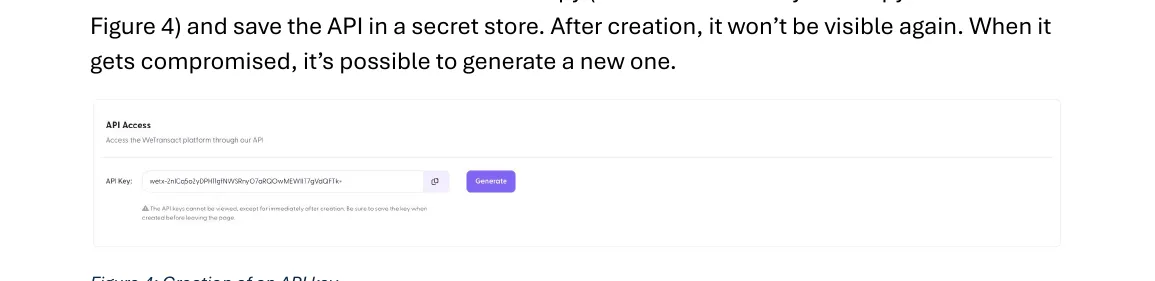
⚠️ The key is only visible once. After leaving the page it won't be shown again. If compromised, generate a new one to invalidate the old key
Part 1: Automated Order Management (AOM)
1. Introduction
📖 API reference: https://apidocs.wetransact.io/openapi/subscriptions When Marketplace publishers have an automated provisioning process, most of them would like to plug in the Marketplace purchase channel with that process. Through the WeTransact Platform that can be achieved by following this guide.
2. Order Process
When selling through the Microsoft Commercial Marketplace, Microsoft dictates the order flow. When AOM is enabled, WeTransact acts as the middleware between Azure Marketplace and your order management system.
How it works:
- Customer makes a purchase → redirected to the WeTransact Landing Page
- Purchaser clicks Confirm Purchase → order sent to the WeTransact Portal
- WeTransact sends a CreateSubscription event to your Event Grid endpoint
- Your system provisions and activates the subscription
- WeTransact notifies Azure Marketplace to confirm activation
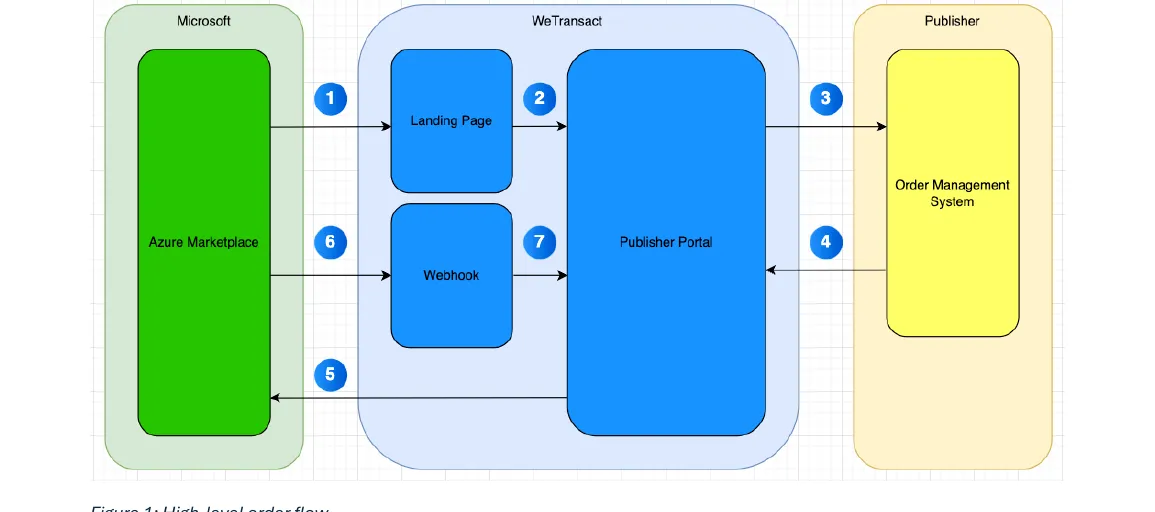
Subsequent lifecycle events — after activation, WeTransact also forwards these:
Event | Description |
|---|---|
Cancellation | Customer cancels; service ends at end of commitment term |
Suspension | Microsoft couldn't collect payment; consider suspending service |
Reinstatement | Payment collected after suspension; reinstate service |
Renewal | Subscription renewed manually or via auto-renew |
Plan change | Customer changed plan tier (e.g. Basic → Standard) |
Seat quantity change | Customer changed number of users (Per-User plans only) |
3 Subscription Activation
Publishers must activate a subscription within 30 days or Microsoft will cancel it automatically.
🚨 30-day window. Set up monitoring and alerts on your order queue to avoid missing this deadline.
There are three ways to activate:
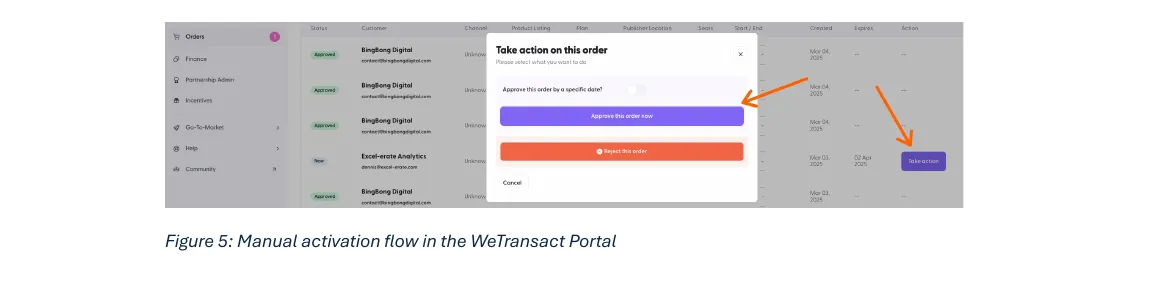
Option 1 — Manual (portal) Go to Orders → click Take Action → approve or reject.
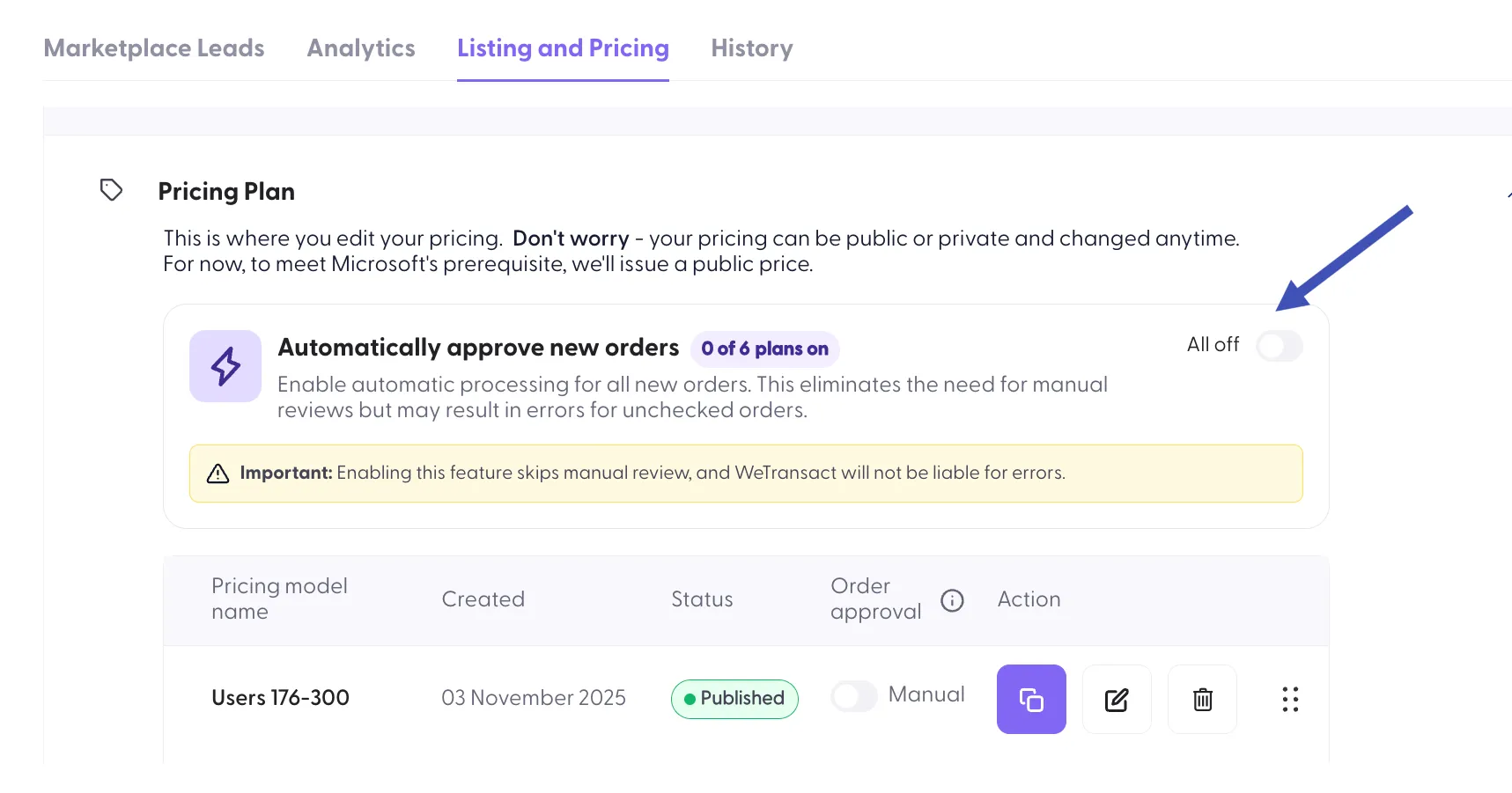
Option 2 — Auto-approve Go to Product Listing → Pricing plan → enable Automatically Approve New Orders(available for all plans or a specific plan).
For all plans
For specific plan
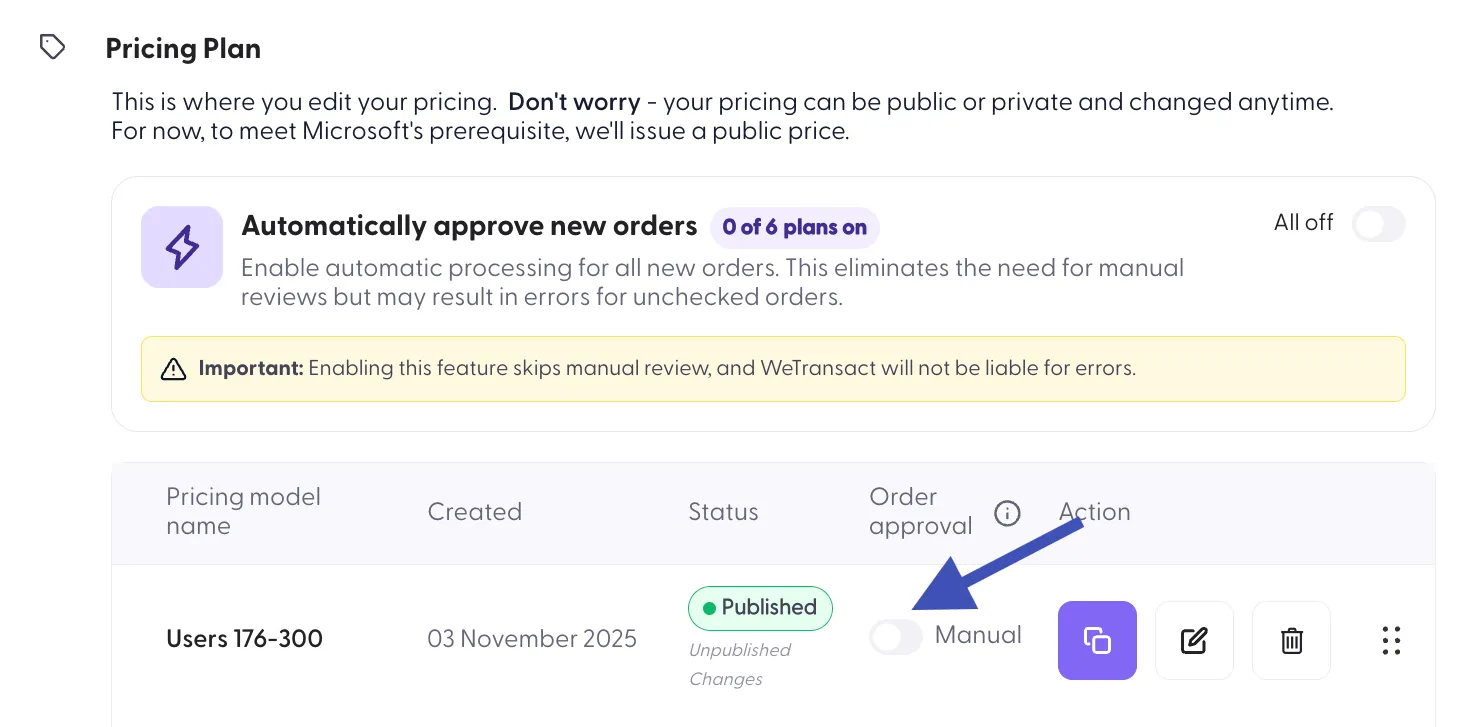
Option 3 — Via API (recommended for AOM) Receive the CreateSubscription event, complete provisioning, then call the API to activate.
3.2 Activation via API
| |
|---|---|
Method | POST |
URL | https://[YOUR-SUBDOMAIN].wetransact.io/api/v1.0/subscriptions/[SUBSCRIPTION-ID]/actions/activate |
Header | x-api-key: [YOUR API KEY] |
Responses:
- 200 OK — processed successfully
- 500 — failed, contact WeTransact Support
ℹ️ A 200 does not guarantee activation. If it fails downstream, WeTransact will send an ActivateSubscriptionFailed event asynchronously. Contact support if this happens.
4. Events & Messages
4.1 CreateSubscription
Sent when a subscription is created. Contains everything needed for provisioning and activation.
Field | Type | Description |
|---|---|---|
MarketplaceSubscriptionId | GUID | Microsoft-assigned ID. Use as your unique identifier. |
Created | DATETIME | Timestamp of subscription creation |
CompanyName | STRING | Name of the purchasing company |
MarketplaceOfferId | STRING | Product ID in Partner Center |
MarketplacePlanId | STRING | Plan (SKU) ID in Partner Center |
SeatQuantity | STRING (optional) | Number of seats — Per-User plans only |
TermUnit | STRING | P1M / P1Y / P2Y / P3Y |
InitialUserEmail | STRING | Email of the purchaser |
AdditionalDetails | STRING (optional) | Extra Landing Page fields, as JSON |
Channel | STRING | Direct or Indirect (CSP) |
BeneficiaryEmail | STRING (optional) | End user email — differs from purchaser when via CSP |
json
4.2 CancelSubscription
Sent when a customer cancels. Service stays active until the end of the committed term.
Field | Type | Description |
|---|---|---|
MarketplaceSubscriptionId | GUID | ID of the cancelled subscription |
json
4.3 SuspendSubscription
Sent when Microsoft cannot collect payment. Consider suspending the service or contacting the customer.
Field | Type | Description |
|---|---|---|
MarketplaceSubscriptionId | GUID | ID of the suspended subscription |
json
4.4 ReinstateSubscription
Sent when Microsoft collects payment after a suspension. Reinstate the service if it was suspended.
Field | Type | Description |
|---|---|---|
MarketplaceSubscriptionId | GUID | ID of the subscription to reinstate |
json
4.5 RenewSubscription
Sent when a subscription is renewed manually or via auto-renew.
Field | Type | Description |
|---|---|---|
MarketplaceSubscriptionId | GUID | ID of the renewed subscription |
json
4.6 ChangePlan
Sent when a customer changes plan tier. Update feature flags, entitlements, or resource allocations.
Field | Type | Description |
|---|---|---|
MarketplaceSubscriptionId | GUID | ID of the affected subscription |
MarketplacePlanId | STRING | ID of the new plan (SKU) |
json
4.7 ChangeSeatQuantity
Sent when a customer changes seat count. Per-User plans only. Update compute/resource allocations accordingly.
Field | Type | Description |
|---|---|---|
MarketplaceSubscriptionId | GUID | ID of the affected subscription |
SeatQuantity | STRING | New total seat count |
json
4.8 ActivateSubscriptionFailed
Sent when activation fails downstream after an API call returned 200 OK. Contact WeTransact Support immediately.
Field | Type | Description |
|---|---|---|
MarketplaceSubscriptionId | GUID | ID of the subscription that failed to activate |
json
5. Message Routing
All messages include a Subject field for filtering in your Event Grid subscription:
Subject | Trigger |
|---|---|
CreateSubscription | New order placed |
CancelSubscription | Customer cancelled |
SuspendSubscription | Payment failure |
ReinstateSubscription | Payment resolved |
RenewSubscription | Subscription renewed |
ChangePlan | Plan tier changed |
ChangeSeatQuantity | Seat count changed |
ActivateSubscriptionFailed | Activation failed downstream |
Part 2: Automated Usage Reporting
Introduction
📖 API reference: https://apidocs.wetransact.io/openapi/subscriptions Some Marketplace publishers have a need to report usage through an API. This is a necessity when the reporting frequency is high (more than once a month). This section explains how the WeTransact API is used to report usage.
The reporting of usage always needs to happen against an active subscription, which is uniquely identifiable by a GUID. When that GUID is obtained, the publisher can report usage by defining the amounts per meter. All API documentation lives at:
https://apidocs.wetransact.io/openapi
This API specification describes all other related API details, including sample request and response messages. Section 7.1 explains how to get access to the WeTransact API.
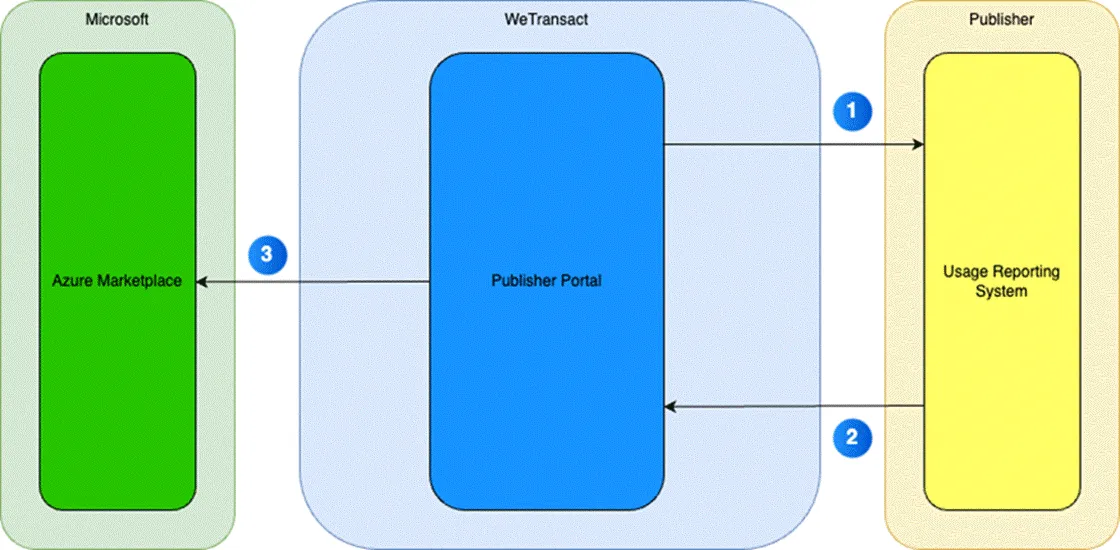
In step 1 the Publisher’s reporting system fetches the right subscription ID (exact field name: marketplaceSubscriptionId) by first getting all subscriptions via the GET /subscriptions endpoint. To include information about meters that are valid for the subscription, the query parameter includeMeters=true should be added. If the subscription ID and meter details are already stored, this step can be skipped.
In step 2, the system on the publisher’s end needs to make a charge against the subscription ID. This is done by calling the POST /subscriptions/{id}/charge endpoint. Here the system defines the subscription ID to charge against, as well as the meter ID and the amount. The WeTransact platform takes care of the message exchange with the Microsoft Marketplace (step 3).
7.1 API Access
When publishers want to automate usage reporting, API access is needed. If no API key has been created, the Settings section will show a Generate button.