Unable to enrol in the commercial Marketplace "Something went wrong. Please try again; if this problem persists, please contact Microsoft support."
5 min
If you are trying to enrol in the Microsoft Commercial Marketplace and encounter an error message such as:
Something went wrong. Please try again. If this problem persists, please contact Microsoft support.
Correlation ID: 6908785e-e3bf-402f-9b79-e32bdab2f1f4
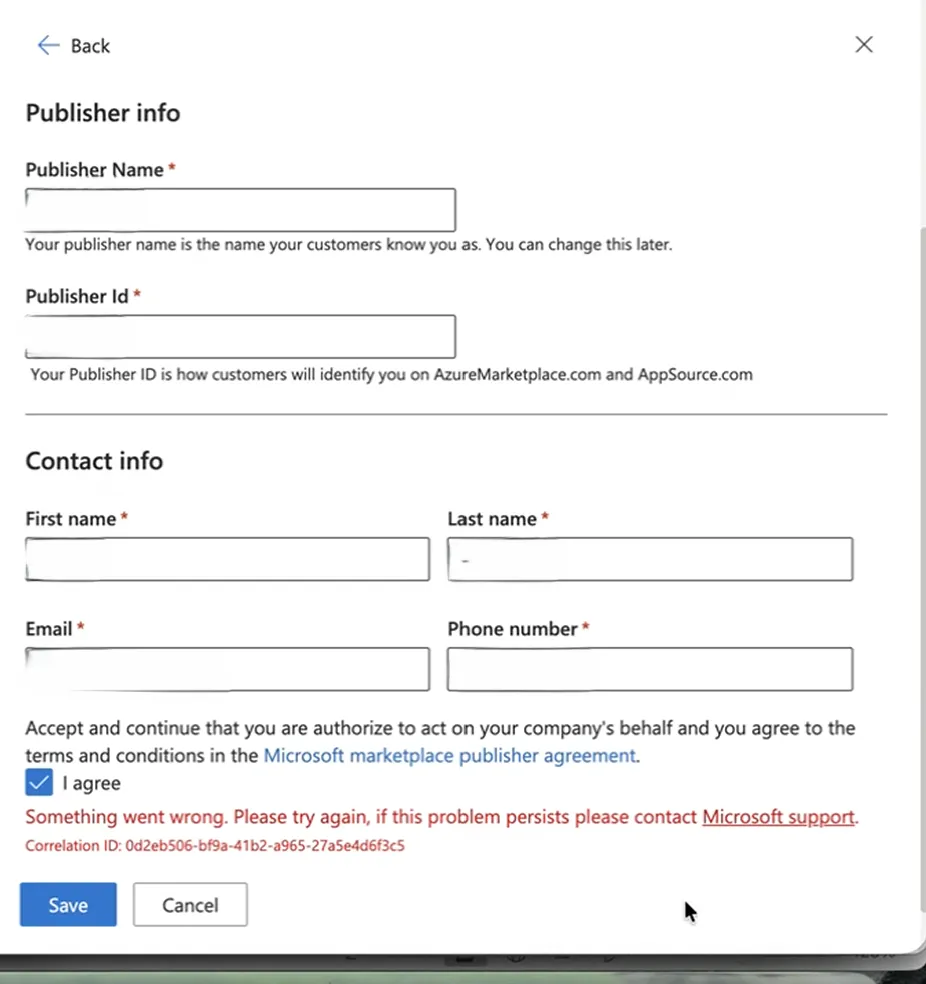
Step 1: Open a Microsoft Support Ticket
Before trying any other steps, we recommend opening a support ticket with Microsoft. They can confirm whether the issue is related to your Partner Center configuration or account permissions.
Step 2: Try This Workaround
If you want to attempt a quick fix while waiting for support, follow the steps below:
- Go to Partner Center.
- Navigate to Account Settings → Legal Info.
- Look for the person listed as the Primary Contact.
- This person often has special access to Partner Center, as they were the one who originally created the account.
- Contact this person and ask if they can complete the Commercial Marketplace enrollment on your behalf.
Step 3: Check the Identifiers Section with this person's account
- Go to the Identifiers section in Partner Center.
- Look for an existing Publisher ID.
- If a publisher is already listed, this means your organization is already enrolled in the Commercial Marketplace.
Step 4: Request User Access
If enrollment already exists:
- Ask the Main Contact to invite you as a user in User Management.
- Once invited, you will regain access and be able to manage your Marketplace settings.
Following these steps should resolve the issue and restore your access to the Commercial Marketplace.
💬 For more, contact us at : [email protected]