Publisher Access control and permissions
By default, the publisher has full access to the managed resource group and the customer has read-only visibility (enforced through deny assignments). While configuring the offer the publisher sets the following items:
- Publisher access: if management access is enabled, the publisher needs to enter their Tenant ID as well as the Principal ID (Object ID in Entra) of the user or group (recommended) that has access to the Managed Resource Group. The publishes chooses access level as well (Owner/Contributor). Optionally, instead of standing access, the publisher can request just-in-time elevated access that the customer approves for a limited period.
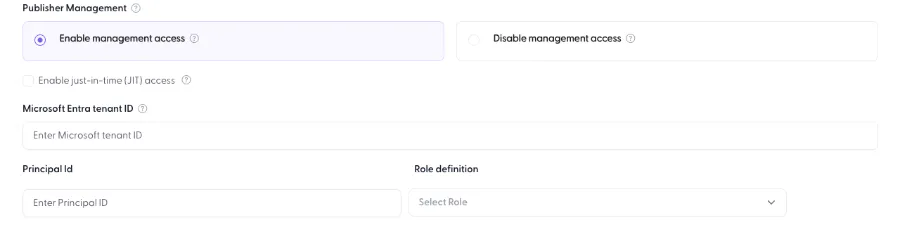
- Customer access: publishers decide at the time of configuring the product if customers should have access. They can have full access or only read access (deny assignment), and that can be specified more by adding allowed customer actions.

Important: publisher management access and customer access settings cannot be changed after the offer is live in the marketplace. Get this right before publishing. Reference: Plan an Azure managed application (Microsoft Learn)
The scenario below describes how a typical setup looks like from a customer’s and publisher’s point of view.
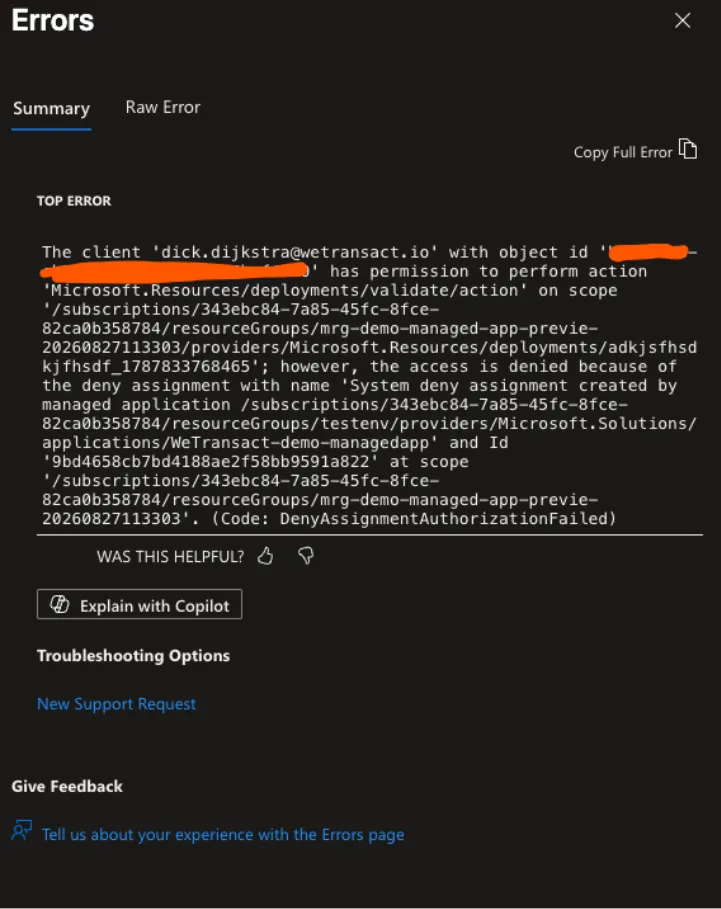
- Customer access: By default, customers can not access the resources inside the resource group because of a Deny Assignment:
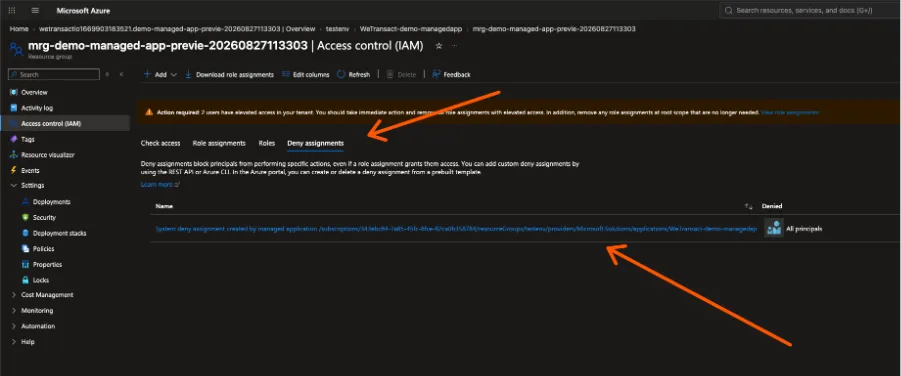
They can see resources, but creating, updating or deleting is not possible:
During publication, customer access can set by explicitly checking a box.
- Publisher access: Publishers do get all access by default. So when the publisher goes to the Managed Application Center in the Azure Portal, they would see this:
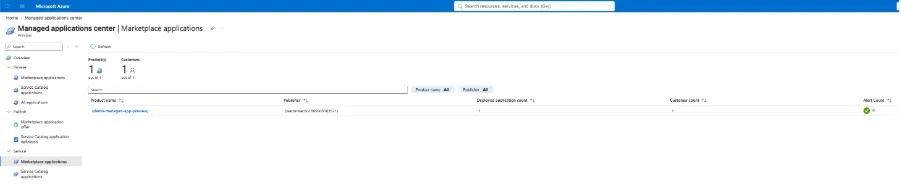
Clicking on the Managed Resource Group will give them direct access:
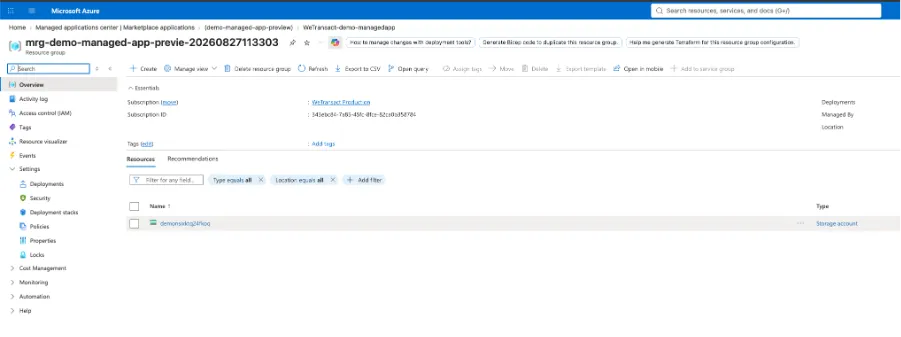
They can create, read, update and delete resources as they have Owner or Contributor permissions (depending on how the offer is published).
🟣 Updating your application
This is where things typically go wrong, so read this section carefully. There are two distinct update paths and they must be kept in sync:
- Existing customers: go into the managed resource group deployed in the customer's subscription (using your management access) and update the product there directly. Guide: Update managed resources (Microsoft Learn).
- New customers: update the .zip deployment package in the plan so new deployments install the new version. Remember republishing can take up to 24 hours.
Warning: never ask an existing customer to delete and redeploy just to get a new version. Redeploying wipes the whole deployment, and that typically means losing data.
For publishers with mature engineering, updates across many customer subscriptions can be automated with standard CI/CD pipelines and cross-tenant management. In practice most publishers do this manually per customer. Sample architecture: Azure Managed Application update sample (GitHub).
🟣 Commercial model
Charge | Who pays it | Notes |
|---|---|---|
Azure infrastructure | Customer, directly to Microsoft | For the resources running in their subscription — VMs, storage, networking. Invoiced separately from your software fee. |
Product fee | Customer, through Marketplace | Flat monthly fee only. No per-user option and no annual term. |
Custom meters | Customer, through Marketplace | Usage-based dimensions, on top of or instead of the flat fee. |
Store service fee | Publisher | Microsoft charges a 3% standard store service fee on transact offers. |
🟣 The flat fee limitation
Only a flat monthly fee is supported as the standard price. Some publishers emulate one- or three-year prepaid terms by setting the flat fee to zero and billing through custom dimensions, but renewal and term enforcement then have to be handled outside Marketplace — through contract terms plus access control in the application.
Custom metering also carries real operational cost. You have to track charges and emit them to Microsoft's metering API at the right time. That is a technical integration, and it changes the commercial picture too: the reporting cadence for usage payouts differs from non-usage payouts on the Microsoft side.
Note: There is also an option to configure a managed app plan for ISV-billed infrastructure, where the Azure resources are billed to you and the customer sees a single flat fee covering infrastructure, licences and management. This shifts Azure cost risk onto publisher — model it carefully before choosing it.
🟣 Cancellation and refunds
The customer pays the full monthly fee. There is no pro-rata refund for a partial month. Microsoft's refund policy states: "You're eligible for a refund of the fixed monthly charge if you delete your managed application within 72 hours of purchase." Delete after that window and the charge stands in full.
Charge | Effect of deleting mid-month |
|---|---|
Fixed monthly fee | Charged in full, no proration. Invoiced up front via next-day invoicing, so it is usually already on an invoice. |
Future monthly fees | Stop. Deleting the managed application ends the recurring charge. |
Custom dimensions | Billed for actual usage up to deletion. Never refundable. |
Underlying Azure resources | On the customer's own Azure subscription. Stop when the resources are deleted. |
For cancellations or refunds beyond the 72-hour window, the customer contacts you as the publisher. If you approve, you submit a ticket to process it through Marketplace.
🟣 Pricing policy disclaimer
Under Microsoft's certification policy, the per-month price and metered billing on a Managed Application must only account for the management fee — they may not be used for IP or software costs, Azure infrastructure, or add-ons. Costs outside the management fee should be incurred through Azure infrastructure charges or pay-as-you-go software costs from the deployed resources, or transacted through a separate VM or container offer.
How you structure and justify your price is your own responsibility. WeTransact cannot advise on this split and cannot take responsibility for pricing that does not comply with Microsoft policy, so make sure your pricing is defensible as a service fee. Reference: Microsoft Marketplace certification policies, section 300.2 — Acquisition, pricing, and terms.
🟣 MACC and co-sell advantage
Managed Applications can earn dual recognition. The customer's infrastructure consumption runs in their own subscription and counts toward their Azure consumption, while your software fee transacts through Marketplace and, when the offer is enrolled correctly, is eligible to decrement the customer's MACC (Microsoft Azure Consumption Commitment). For you as publisher, Managed Application consumption can also contribute toward Azure IP co-sell eligibility thresholds.
Note: MACC eligibility is per offer, not per product, and the offer must meet all Azure IP co-sell eligibility requirements first. Free and BYOL (bring your own licence) offers are not transactable and do not qualify.
🟣 Cancellation and ending the contract
When a customer deploys a Managed Application, two things exist in their subscription:
- The managed application resource — the reference object in the resource group the customer chose. The customer fully controls this object.
- The managed resource group — where the actual solution resources live. The customer can see it, and can delete it, but cannot look inside by default.
To cancel, the customer deletes the managed application resource. Azure then automatically deletes the managed resource group with all its resources and stops future billing. The deletion takes a few minutes, and WeTransact receives a notification that the order has been cancelled.
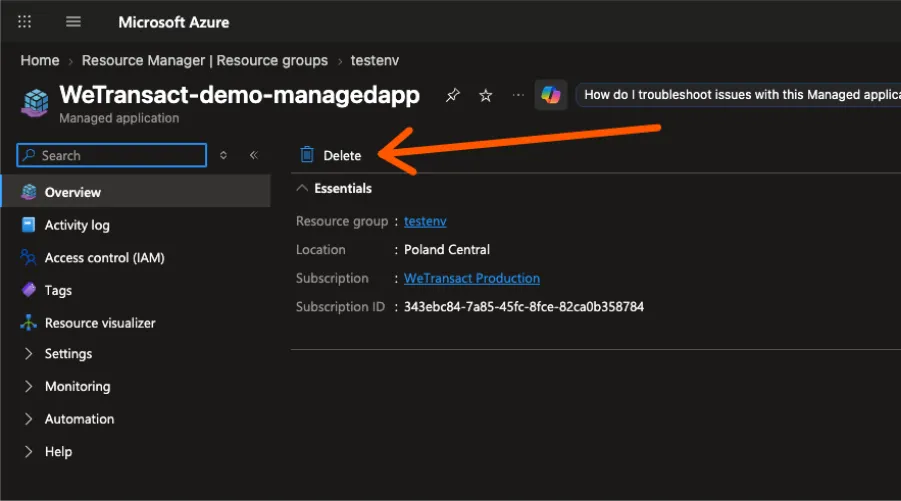
Warning: Deletion is not reversible and takes all deployed data with it. Make sure the customer has exported anything they need first.
💬 For more, contact us at : [email protected]