Build Managed Application Offer
🟣 Building the offer: the deployment package
To create a Managed Application offer you first build your solution in a repeatable deployment format. Azure uses ARM templates to define the infrastructure deployed into the customer's environment.
You prepare a deployment package — a .zip file containing two files at the root:
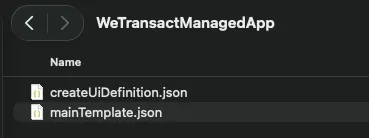
Warning:The deployment package must not contain binaries such as VM images. Reference all images from Marketplace instead.
🟣 mainTemplate.json
An ARM template defining every Azure resource that makes up your application — virtual machines, storage accounts, databases, networking and so on. This template runs in the customer's subscription at deployment time.
- File name casing matters. The file must be named exactly mainTemplate.json, at the root of the zip.
- Validate before uploading. Run the ARM Template Test Toolkit (ARM TTK) against the package. It checks the template, the parameters and the UI definition against Marketplace requirements.
- Start from working samples. There are public repositories with hundreds of samples: Azure managed app samples on GitHub, the sample projects index and the broader Azure quickstart templates.
🟣 createUiDefinition.json
The UI definition file drives the interface your customer sees in the Azure portal during deployment. It lets you ask for configuration inputs — instance name, sizing, admin credentials, optional settings — in a wizard. The outputs of this form map one-to-one to the parameters of mainTemplate.json.
- File name casing matters. The file must be named exactly createUiDefinition.json, at the root of the zip.
- Preview it in the sandbox. Paste your file into the Create UI Definition Sandbox to preview the exact portal experience without deploying anything. Guide: Test your portal interface.
- Reference docs: createUiDefinition overview with all supported elements and functions.
Tip: Microsoft's free Mastering the Marketplace — Azure Managed Applications track has hands-on labs and videos covering the whole package-building process.
🟣 Working example
The end result of development is two JSON files, zipped together and uploaded in the WeTransact portal. Depending on what you deploy, these files range from trivial to very large. The example below deploys a single storage account with one blob container.
🟣 mainTemplate.json
{
  "$schema": "https://schema.management.azure.com/schemas/2019-04-01/deploymentTemplate.json#",
  "contentVersion": "1.0.0.0",
  "parameters": {
    "storageAccountType": {
      "type": "string",
      "defaultValue": "Standard_LRS",
      "allowedValues": [ "Standard_LRS", "Standard_GRS", "Premium_LRS" ]
    },
    "location": {
      "type": "string",
      "defaultValue": "[resourceGroup().location]"
    },
    "containerName": {
      "type": "string",
      "defaultValue": "demo"
    }
  },
  "variables": {
    "storageAccountName": "[concat('demo', uniqueString(resourceGroup().id))]"
  },
  "resources": [
    {
      "type": "Microsoft.Storage/storageAccounts",
      "apiVersion": "2025-06-01",
      "name": "[variables('storageAccountName')]",
      "location": "[parameters('location')]",
      "sku": { "name": "[parameters('storageAccountType')]" },
      "kind": "StorageV2",
      "properties": {
        "supportsHttpsTrafficOnly": true,
        "minimumTlsVersion": "TLS1_2",
        "allowBlobPublicAccess": false
      }
    },
    {
      "type": "Microsoft.Storage/storageAccounts/blobServices/containers",
      "apiVersion": "2025-06-01",
      "name": "[concat(variables('storageAccountName'), '/default/', parameters('containerName'))]",
      "dependsOn": [
        "[resourceId('Microsoft.Storage/storageAccounts', variables('storageAccountName'))]"
      ],
      "properties": { "publicAccess": "None" }
    }
  ],
  "outputs": {
    "storageAccountName": {
      "type": "string",
      "value": "[variables('storageAccountName')]"
    }
  }
}
This template takes three input parameters — location, storageAccountType and containerName. The customer supplies them through the Azure portal UI, which is defined in createUiDefinition.json. Note that the outputs of the UI definition below match the parameters of the template above.
🟣 createUiDefinition.json
{
  "$schema": "https://schema.management.azure.com/schemas/0.1.2-preview/CreateUIDefinition.MultiVm.json#",
  "handler": "Microsoft.Azure.CreateUIDef",
  "version": "0.1.2-preview",
  "parameters": {
    "basics": [],
    "steps": [
      {
        "name": "storageConfig",
        "label": "Storage",
        "elements": [
          {
            "name": "storageAccountType",
            "type": "Microsoft.Common.DropDown",
            "label": "Storage account type",
            "defaultValue": "Standard_LRS",
            "toolTip": "Redundancy/performance tier for the demo storage account.",
            "constraints": {
              "allowedValues": [
                { "label": "Standard_LRS", "value": "Standard_LRS" },
                { "label": "Standard_GRS", "value": "Standard_GRS" },
                { "label": "Premium_LRS", "value": "Premium_LRS" }
              ],
              "required": true
            }
          },
          {
            "name": "containerName",
            "type": "Microsoft.Common.TextBox",
            "label": "Blob container name",
            "defaultValue": "demo",
            "toolTip": "Container created inside the storage account.",
            "constraints": {
              "required": true,
              "regex": "^[a-z0-9]([a-z0-9-]{1,61}[a-z0-9])$",
              "validationMessage": "3-63 chars, lowercase letters, numbers and hyphens; must start and end with a letter or number."
            }
          }
        ]
      }
    ],
    "outputs": {
      "storageAccountType": "[steps('storageConfig').storageAccountType]",
      "containerName": "[steps('storageConfig').containerName]",
      "location": "[location()]"
    }
Tip: If you do not have the in-house engineering capacity to build the package, WeTransact's partner Cloudsoft creates, tests and implements Managed Application packages. See cloudsoft.io/partners/wetransact.
🟣 Uploading and publishing with WeTransact
- In the WeTransact portal, create the Managed Application listing and complete the product description, media and plans — the same flow as any other listing.
- Upload the .zip package in the plan, in the field "Zip file containing mainTemplate.json and createUiDefinition.json files". [Screenshot: 02-portal-add-zip-file.png — the Add ZIP file control in the Media section of the listing]
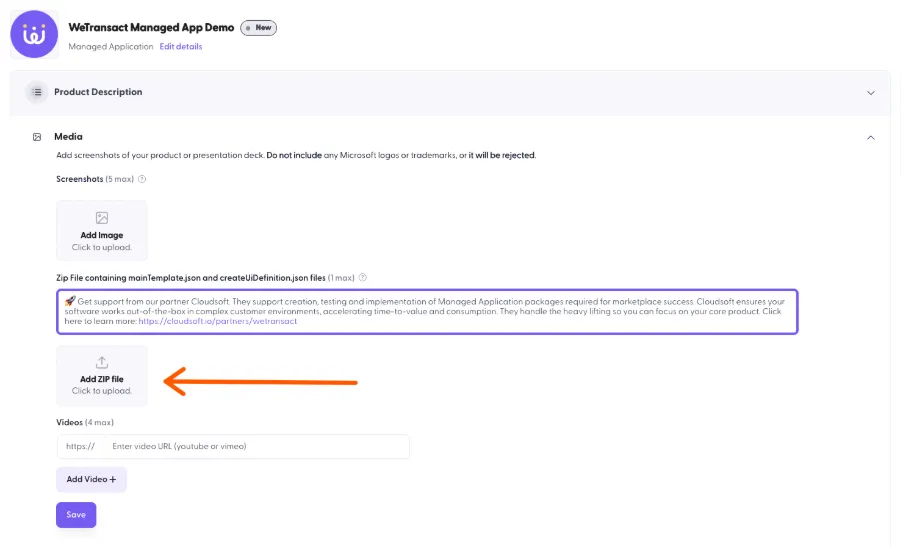
Then click Validate.
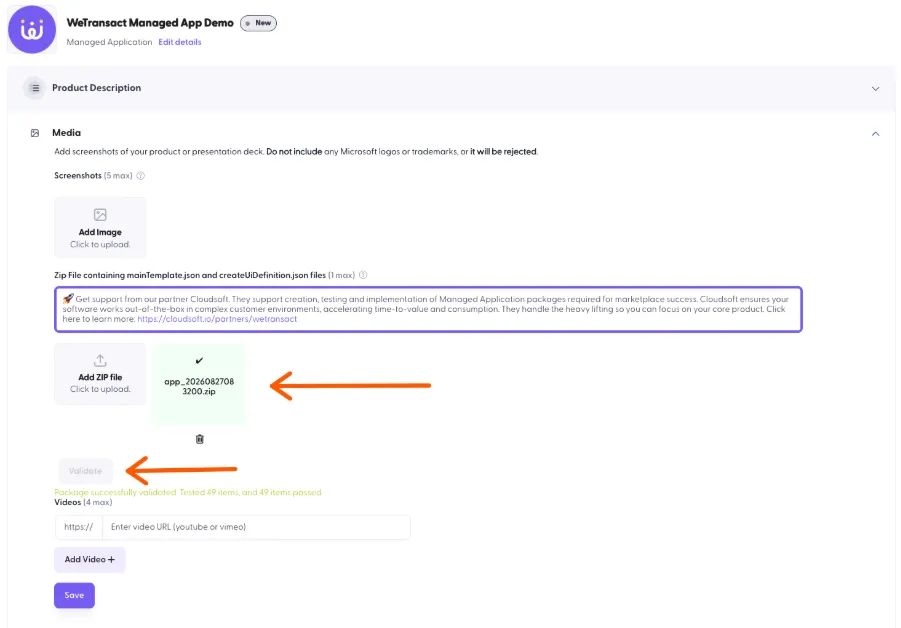
If everything is good, the validation will succeed. If not, you will see an error message:
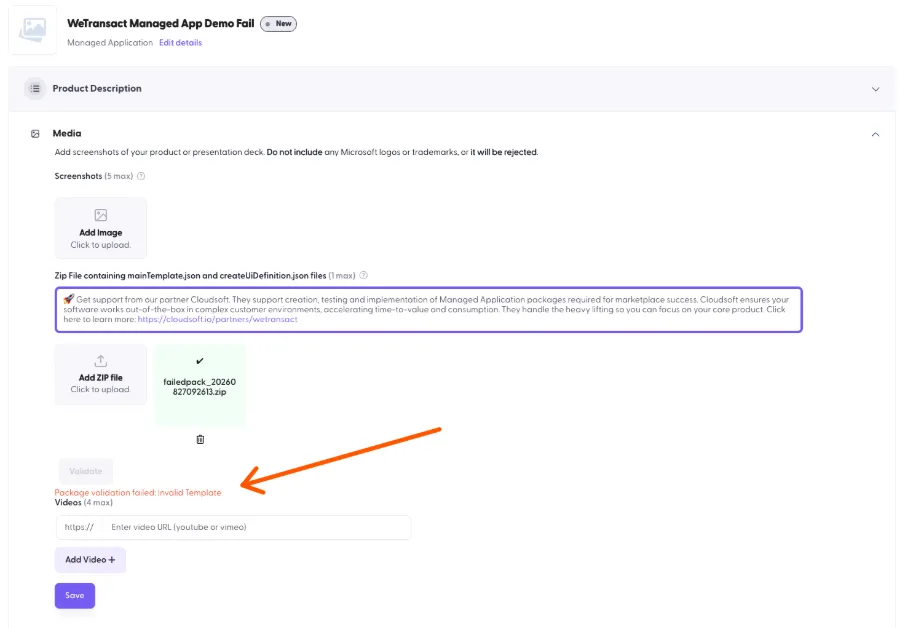
It’s recommended to run the validation yourself as well.
- Publish. Initial publication of a Managed Application offer typically takes up to 24 hours to go live, and republishing an update takes about as long. This is slower than SaaS because Microsoft performs a manual certification pass on the template files.[TO CONFIRM — the 24-hour figure is WeTransact's observed experience, not a documented Microsoft SLA.]
💬 For more, contact us at : [email protected]