构建托管应用程序产品/服务
🟣 构建产品:部署包
要创建一个 Managed Application 产品,您首先需要以可重复的部署格式构建您的解决方案。Azure 使用 ARM 模板来定义部署到客户环境中的基础设施。
您需要准备一个 部署包 —— 一个 .zip 文件,在根目录中包含两个文件:
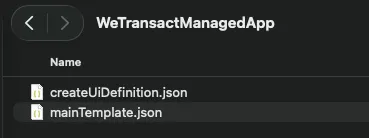
警告:部署包不得包含 VM 镜像等二进制文件。请改为从 Marketplace 引用所有镜像。
🟣 mainTemplate.json
一个 ARM 模板,用于定义构成您应用程序的每个 Azure 资源——虚拟机、存储账户、数据库、网络等。此模板会在部署时于客户的订阅中运行。
- 文件名大小写很重要。 文件必须精确命名为 mainTemplate.json,并位于 zip 文件的根目录。
- 上传前请先验证。 对该部署包运行 ARM Template Test Toolkit (ARM TTK)。它会根据 Marketplace 要求检查模板、参数和 UI 定义。
- 从可用示例开始。 有多个公共仓库提供了数百个示例:GitHub 上的 Azure managed app 示例、示例项目索引以及更广泛的 Azure 快速入门模板。
🟣 createUiDefinition.json
UI 定义文件控制客户在 Azure 门户中部署期间看到的界面。它允许您在向导中请求配置输入——实例名称、规格、管理员凭据、可选设置等。此表单的输出与 mainTemplate.json 的参数一一对应。
- 文件名大小写很重要。 文件必须精确命名为 createUiDefinition.json,并位于 zip 文件的根目录。
- 在沙箱中预览。 将您的文件粘贴到 Create UI Definition Sandbox 中,以便在不部署任何内容的情况下预览完整的门户体验。指南:测试您的门户界面
- 参考文档: createUiDefinition 概述,其中包含所有受支持的元素和函数。
提示: Microsoft 提供的免费 掌握市场——Azure 托管应用程序课程包含实践实验和视频,涵盖整个构建部署包的流程。
🟣 工作示例
开发完成后的最终结果是两个 JSON 文件,它们会被打包为 zip 并上传到 WeTransact 门户。根据您部署的内容不同,这些文件可能非常简单,也可能非常庞大。下面的示例会部署一个包含单个 blob 容器的存储账户。
🟣 mainTemplate.json
{
  "$schema": "https://schema.management.azure.com/schemas/2019-04-01/deploymentTemplate.json#",
  "contentVersion": "1.0.0.0",
  "parameters": {
    "storageAccountType": {
      "type": "string",
      "defaultValue": "Standard_LRS",
      "allowedValues": [ "Standard_LRS", "Standard_GRS", "Premium_LRS" ]
    },
    "location": {
      "type": "string",
      "defaultValue": "[resourceGroup().location]"
    },
    "containerName": {
      "type": "string",
      "defaultValue": "demo"
    }
  },
  "variables": {
    "storageAccountName": "[concat('demo', uniqueString(resourceGroup().id))]"
  },
  "resources": [
    {
      "type": "Microsoft.Storage/storageAccounts",
      "apiVersion": "2025-06-01",
      "name": "[variables('storageAccountName')]",
      "location": "[parameters('location')]",
      "sku": { "name": "[parameters('storageAccountType')]" },
      "kind": "StorageV2",
      "properties": {
        "supportsHttpsTrafficOnly": true,
        "minimumTlsVersion": "TLS1_2",
        "allowBlobPublicAccess": false
      }
    },
    {
      "type": "Microsoft.Storage/storageAccounts/blobServices/containers",
      "apiVersion": "2025-06-01",
      "name": "[concat(variables('storageAccountName'), '/default/', parameters('containerName'))]",
      "dependsOn": [
        "[resourceId('Microsoft.Storage/storageAccounts', variables('storageAccountName'))]"
      ],
      "properties": { "publicAccess": "None" }
    }
  ],
  "outputs": {
    "storageAccountName": {
      "type": "string",
      "value": "[variables('storageAccountName')]"
    }
  }
}此模板接受三个输入参数——位置、存储帐户类型 和 containerName。客户通过 Azure 门户 UI 提供这些参数,其定义位于 createUiDefinition.json 中。请注意,下面 UI 定义中的 输出 与上面模板中的 参数 相匹配。
🟣 createUiDefinition.json
{
  "$schema": "https://schema.management.azure.com/schemas/0.1.2-preview/CreateUIDefinition.MultiVm.json#",
  "handler": "Microsoft.Azure.CreateUIDef",
  "version": "0.1.2-preview",
  "parameters": {
    "basics": [],
    "steps": [
      {
        "name": "storageConfig",
        "label": "Storage",
        "elements": [
          {
            "name": "storageAccountType",
            "type": "Microsoft.Common.DropDown",
            "label": "Storage account type",
            "defaultValue": "Standard_LRS",
            "toolTip": "Redundancy/performance tier for the demo storage account.",
            "constraints": {
              "allowedValues": [
                { "label": "Standard_LRS", "value": "Standard_LRS" },
                { "label": "Standard_GRS", "value": "Standard_GRS" },
                { "label": "Premium_LRS", "value": "Premium_LRS" }
              ],
              "required": true
            }
          },
          {
            "name": "containerName",
            "type": "Microsoft.Common.TextBox",
            "label": "Blob container name",
            "defaultValue": "demo",
            "toolTip": "Container created inside the storage account.",
            "constraints": {
              "required": true,
              "regex": "^[a-z0-9]([a-z0-9-]{1,61}[a-z0-9])$",
              "validationMessage": "3-63 chars, lowercase letters, numbers and hyphens; must start and end with a letter or number."
            }
          }
        ]
      }
    ],
    "outputs": {
      "storageAccountType": "[steps('storageConfig').storageAccountType]",
      "containerName": "[steps('storageConfig').containerName]",
      "location": "[location()]"
    }
提示:如果您没有内部工程能力来构建该包,WeTransact 的合作伙伴 Cloudsoft 可以创建、测试并实施 Managed Application 包。请参见 cloudsoft.io/partners/wetransact.
🟣 使用 WeTransact 上传和发布
- 在 WeTransact 门户中,创建 Managed Application 列表并完成产品描述、媒体和计划——流程与任何其他列表相同。
- 在计划中上传 .zip 包,在字段“Zip file containing mainTemplate.json and createUiDefinition.json files”中上传。[截图:02-portal-add-zip-file.png —— 列表的 Media 部分中的 Add ZIP file 控件]
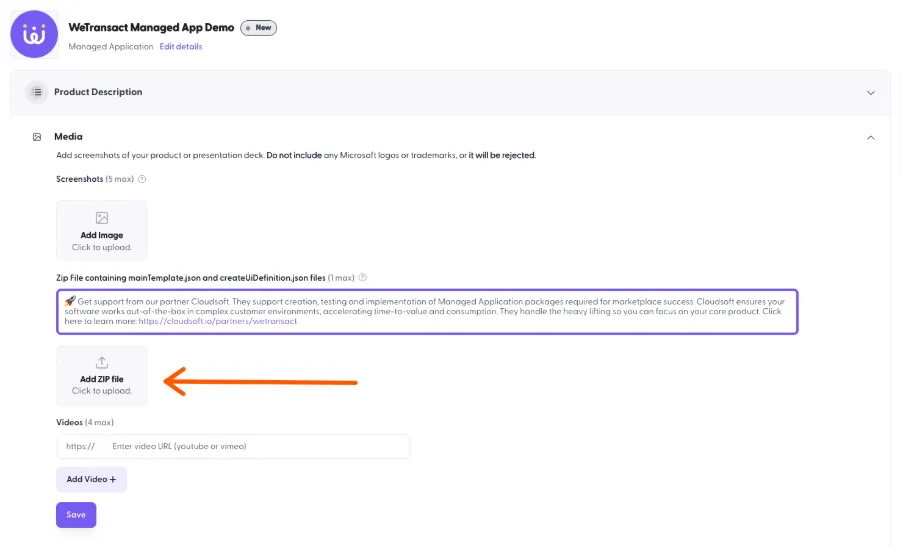
然后点击 Validate。
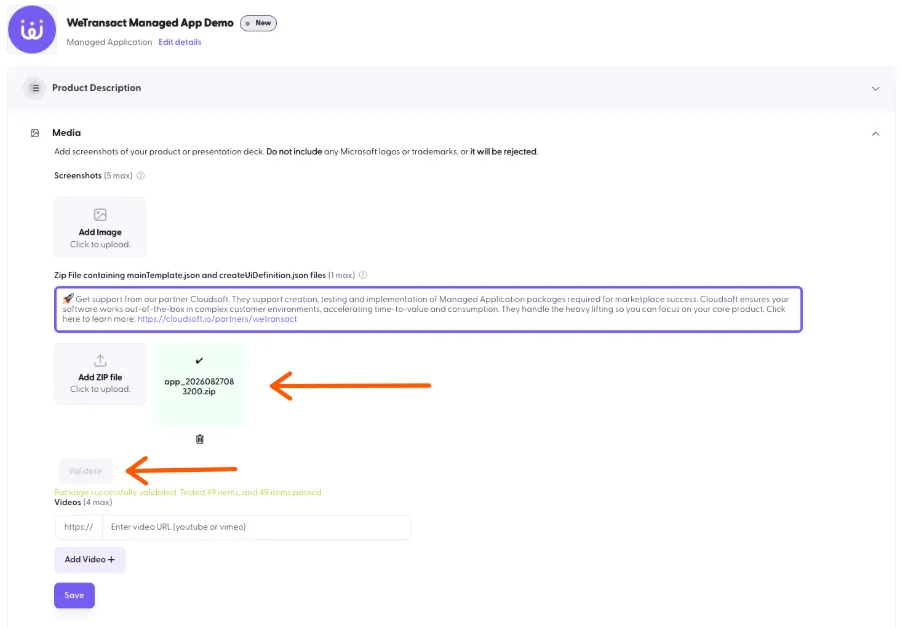
如果一切正常,验证将成功。如果不正常,您将看到一条错误消息:
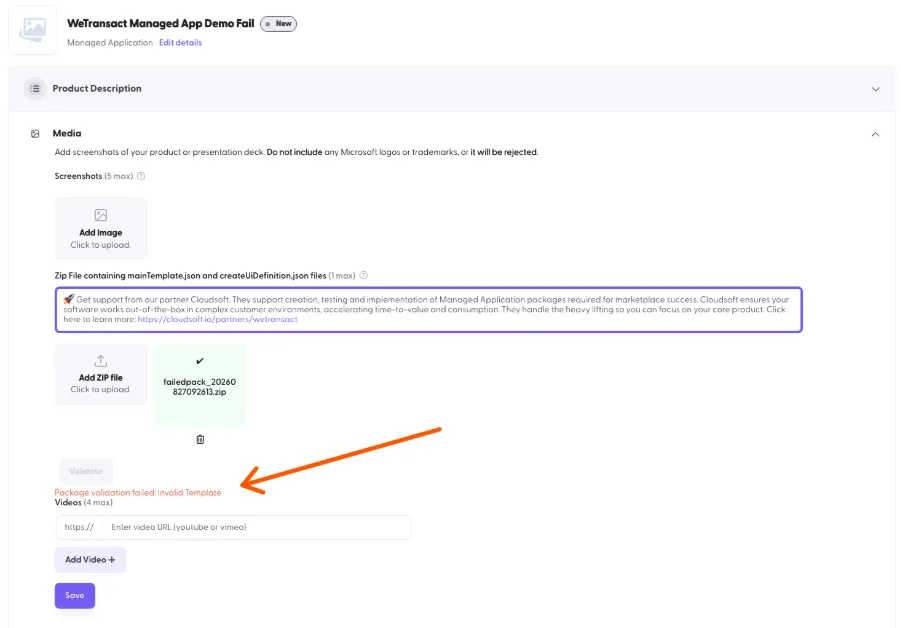
也建议您自行运行验证。
- 发布。 Managed Application 产品的首次发布通常需要最多 24 小时才能上线,而重新发布更新所需时间也大致相同。这比 SaaS 更慢,因为 Microsoft 会对模板文件执行人工认证审核。[待确认——24 小时这一数字是 WeTransact 观察到的经验值,而不是 Microsoft 官方记录的 SLA。]
💬 如需了解更多,请通过以下方式联系我们:[email protected]