---
title: Step 1 — Create Your Microsoft Work Account
slug: step-1-create-your-microsoft-work-account
icon: {"faIcon":"fa-brands fa-wordpress"}
docTags: h7vX9UPf_8DfvriH5282f
createdAt: 2026-01-15T15:39:50.294Z
---

**Microsoft Work Account:&#x20;**

**If you don't have an existing Microsoft 365 or if your domain is hosted on Google. You need a Microsoft work account to register for Partner Center.**

***

### 🟣 Step 1: Start the Process


:::hint{type="success"}
***▲ Go to&#x20;******[Partner Center](https://partner.microsoft.com/en-GB/)******&#x20;and click '***<font color="#A855F7">***Become a partner.***</font>***'&#x20;***
:::


![](https://api.archbee.com/api/optimize/wlBoYP3-_D88k8I6lqBSW/53nrvUa8RZGvpSwS-TIrk_chrome-capture-2026-1-15.jpeg)


:::hint{type="success"}
***▲&#x20;*&#x53;elect Build and go next&#x20;**
:::


![](https://api.archbee.com/api/optimize/wlBoYP3-_D88k8I6lqBSW/CYH-52LRqsSLngYgppNgN_chrome-capture-2026-1-15-1.jpeg)


:::hint{type="success"}
***▲&#x20;*&#x43;lick on** <font color="#A855F7">***Create Work Account***</font>
:::


![](https://api.archbee.com/api/optimize/wlBoYP3-_D88k8I6lqBSW/dzs_w56GlXMeEs1tsDgle_chrome-capture-2026-1-15-2.jpeg)

### 🟣 Step 2: Enter Your Details


:::hint{type="success"}
***▲&#x20;*&#x45;nter your Email and go next.**
:::


![](https://api.archbee.com/api/optimize/wlBoYP3-_D88k8I6lqBSW/iOpH_ysISo5l6l2Kohu-U_chrome-capture-2026-1-15-3.jpeg)


:::hint{type="success"}
***▲&#x20;*&#x43;lick on Setup Account**
:::


![](https://api.archbee.com/api/optimize/wlBoYP3-_D88k8I6lqBSW/bMjbKBM56sqqQ0wCbasYn_chrome-capture-2026-1-15-6.jpeg)


:::hint{type="success"}
***▲&#x20;*&#x49;t will prompt you to enter company details.**&#x20;
:::


![](https://api.archbee.com/api/optimize/wlBoYP3-_D88k8I6lqBSW/zy44tsObTCkhjBT9Qgz_u_chrome-capture-2026-1-15-7.jpeg)


:::hint{type="warning"}
***▲ When entering your phone number, use your country code without the plus sign.***
:::


![](https://api.archbee.com/api/optimize/wlBoYP3-_D88k8I6lqBSW/8zlMlp1OawXAmp3CAcRyf_screenshot-2026-01-15-at-160414.png)

###

### 🟣Step 3: Complete Payment

![](https://api.archbee.com/api/optimize/wlBoYP3-_D88k8I6lqBSW/QcM-xsgcNqC3Sr2Qhmdtc_chrome-capture-2026-1-15-9.jpeg)


:::hint{type="danger"}
***▲ If the payment fails:&#x20;***

**S*ometimes Microsoft's system fails during payment. If this happens:***
:::


![](https://api.archbee.com/api/optimize/wlBoYP3-_D88k8I6lqBSW/HMGV7HETJwZkY4iAF9Va6_screenshot-2026-01-15-at-172920.png)

**Instead:**

:::hint{type="success"}
**1. Close the current process**

**2. Start again using a different email address from your company**

**Example: if john\@yourcompany.com failed, try sarah\@yourcompany.com**

**3. Microsoft will automatically create a new work account, possibly with numbers added (e.g.,yourcompany123.onmicrosoft.com)**
:::

![](https://api.archbee.com/api/optimize/wlBoYP3-_D88k8I6lqBSW/Gr8_gRGLNuPvhON-daItT_chatgpt-image-jan-15-2026-05-34-46-pm.png)


:::hint{type="info"}
***▲&#x20;*&#x54;his is normal and works perfectly fine.**
:::


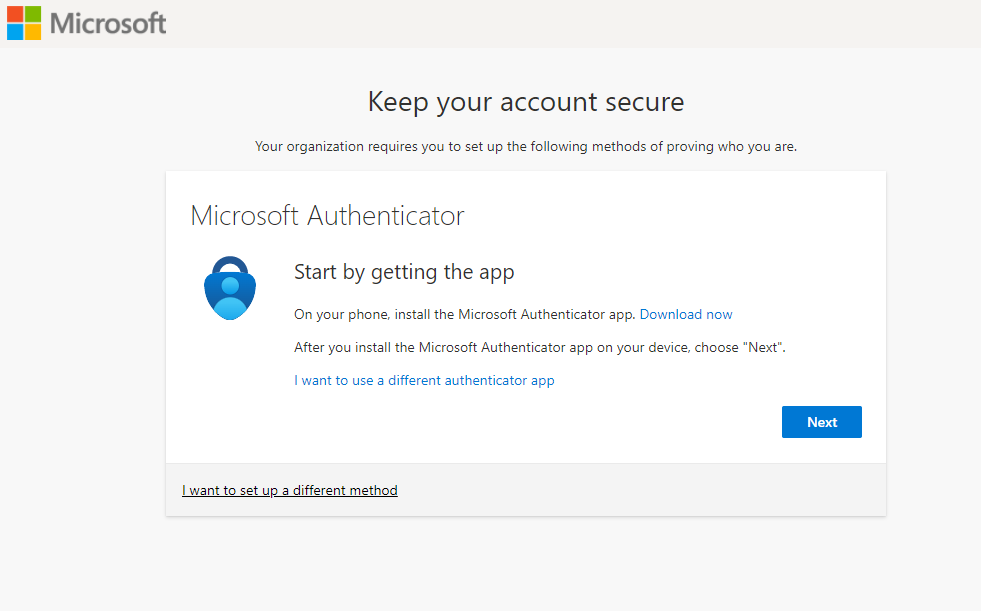
### 🟣 Step 4: Set Up Multi-Factor Authentication (MFA)

![](https://api.archbee.com/api/optimize/wlBoYP3-_D88k8I6lqBSW/v96CmAWOC8J8tso9tWr6u_screenshot-2026-01-15-at-175351.png)

****

**Your work account is not completed until MFA is configured.**

****
![](https://learn.microsoft.com/en-us/entra/identity/authentication/media/concept-mfa-howitworks/sign-in-screen.png)

:::hint{type="success"}
***▲&#x20;*&#x4D;FA is now set up.&#x20;**
:::


![](https://images.tango.us/workflows/760dbf99-b6b9-46d7-a0b6-bc2656b586ad/steps/663c7201-491b-447a-a3da-9c4e77709d7f/cd7857b1-b371-40d5-ae5e-0a868edfc6da.png?crop=focalpoint\&fit=crop\&fp-x=0.5000\&fp-y=0.5000\&w=1200\&border=2%2CF4F2F7\&border-radius=8%2C8%2C8%2C8\&border-radius-inner=8%2C8%2C8%2C8\&mark-x=878\&mark-y=440\&m64=aHR0cHM6Ly9pbWFnZXMudGFuZ28udXMvc3RhdGljL2JsYW5rLnBuZz9tYXNrPWNvcm5lcnMmYm9yZGVyPTQlMkMwMjE3NzQmdz05NyZoPTQ0JmZpdD1jcm9wJmNvcm5lci1yYWRpdXM9MTA%3D)

### 🟣 Step 5: Continue to Partner Center Registration


:::hint{type="success"}
***▲&#x20;*&#x4F;nce MFA is active, you can proceed with your Partner Center registration.**
:::


**&#x20;Partner Center registration setup completed after successful work account creation: 👇🏻**

****

![](https://api.archbee.com/api/optimize/wlBoYP3-_D88k8I6lqBSW/WxUMm2rGA63Fxi742Font_chrome-capture-2026-1-15-10.jpeg)

:::hint{type="danger"}
**Still Stuck? 👇🏻**
:::

****

::::LinkArray{contentSource="CUSTOM" itemsPerRow="1"}
:::LinkArrayItem{headerType="NONE"}
### <font color="#A855F7">💬 **Need Help?**</font>

**Contact:&#x20;**<font color="#A855F7">***support\@wetransact.io***</font>&#x20;
:::
::::

